
OmniView
A multifunctional OLED smart desk for immersive work and productivity
Exploring how integrated digital surfaces can transform everyday desks into immersive, adaptive workspaces.
OmniView is a multifunctional OLED smart desk designed to create an immersive, ergonomic, and space-efficient workstation.
It integrates four adjustable OLED panels into the desk structure, offering a seamless digital workspace for creative, technical, and entertainment workflows.
Research & Insights
-
Multi-screen work setups are common among designers, developers, gamers, and digital creators.
-
Traditional workstations rely on bulky monitors that create visual clutter and reduce ergonomic comfort.
-
Users want:
A unified, clutter-free workspace
Flexible displays that adapt to different tasks
Better multitasking capability
-
Insight: Integrating display surfaces directly into the furniture creates a continuous workspace without sacrificing simplicity or space.


Design Opportunity
How might we create a desk that adapts to multitasking demands while maintaining a minimal presence in home environments?
Opportunity: A hybrid furniture-technology product that transitions between minimal desk mode and immersive panoramic mode.
Design Inspiration
-
Multi-monitor gaming setups
-
Editing and production studios
-
Ergonomic workstation research
-
Flexible and modular tech furniture
-
Minimalist Scandinavian desk forms
Concept Vision
-
A desk that merges display technology with functional furniture.
-
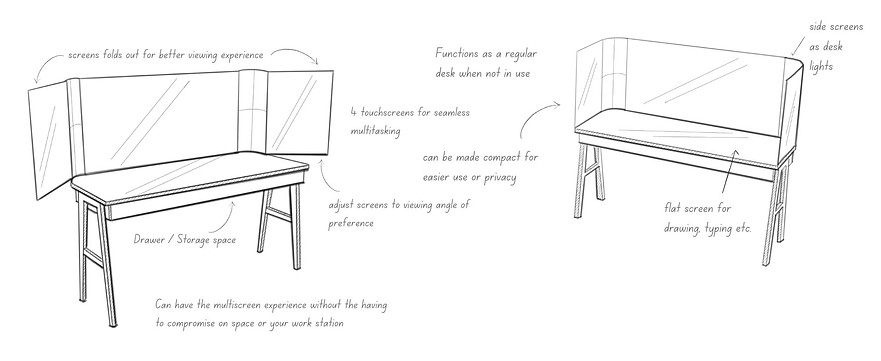
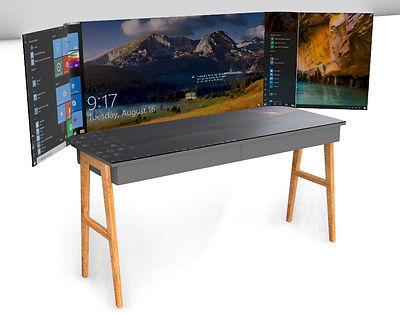
Four OLED panels that unfold to create a panoramic workspace.
-
Touch-enabled surfaces for sketching, typing, and interactive workflows.
-
Compact form when closed; full digital command center when opened.
How It Works
-
Side OLED panels unfold for a curved, immersive viewing setup.
-
Horizontal display functions as a touch surface for typing, drawing, and editing.
-
Panels adjust for ergonomics, gaming, editing, or multi-window productivity.
-
Desk maintains a clean silhouette when screens are folded and powered off.
System Architecture
-
Central OLED Display: Main workspace screen.
-
Left & Right OLED Panels: Foldable panels for extended panoramic view.
-
Horizontal OLED Surface: Touch display for drawing and multi-modal input.
-
Storage & Cable Management: Integrated compartments to maintain a clean desk.
-
Ambient Lighting Mode: OLED panels function as soft desk lights when idle.

Interaction & Features
-
Touch-enabled screens allow typing, sketching, navigation, and layout editing.
-
Folding vertical screens adapt to user preference and task requirements.
-
Horizontal screen supports note-taking, drawing, and media control.
-
Built-in drawers and cable routing keep the workspace organized.
-
Dual-mode operation:
Desk mode: Functions as a regular desk
Smart mode: Activates all displays for multitasking


User Experience Scenarios
-
Creative Workflows: Designers and artists use the panoramic workspace to keep reference images, tools, and editing software open simultaneously.
-
Software Development: Developers view multiple terminal windows, documentation, and debugging tools across separate display zones for efficient multitasking.
-
Investment Banking & Financial Analysis: Analysts monitor market dashboards, trading platforms, and live financial data streams across the extended OLED panels, while using the horizontal touch display for real-time calculations and annotations.
-
Content Creation & Editing; Video editors and streamers use side screens for timelines, tool palettes, or chat windows while keeping the main content centered.
-
Data Visualization & Research: Researchers compare datasets, run visualizations, and take notes on the horizontal display without switching between windows.
-
Gaming & Entertainment: Gamers take advantage of the curved multi-screen setup for immersive gameplay and enhanced field of view.
-
Hybrid Work / Home Office: Users switch between a clean, minimalist desk during meetings and a full digital workspace when multitasking or problem-solving.

Outcome
OmniView delivers a unified, adaptive digital workspace that blends into home interiors while supporting high-performance multitasking.
It anticipates the future of hybrid work, digital production, and immersive computing.
By combining adaptability, ergonomics, and advanced display systems, it presents a future-forward approach to workspace design.